> For the complete documentation index, see [llms.txt](https://nenoso.gitbook.io/gdw/llms.txt). Markdown versions of documentation pages are available by appending `.md` to page URLs; this page is available as [Markdown](https://nenoso.gitbook.io/gdw/readme.md).
# Game Data Workbench
**Core version 1.2.1** — see the [release notes](/gdw/reference/release-notes.md) for what's new.
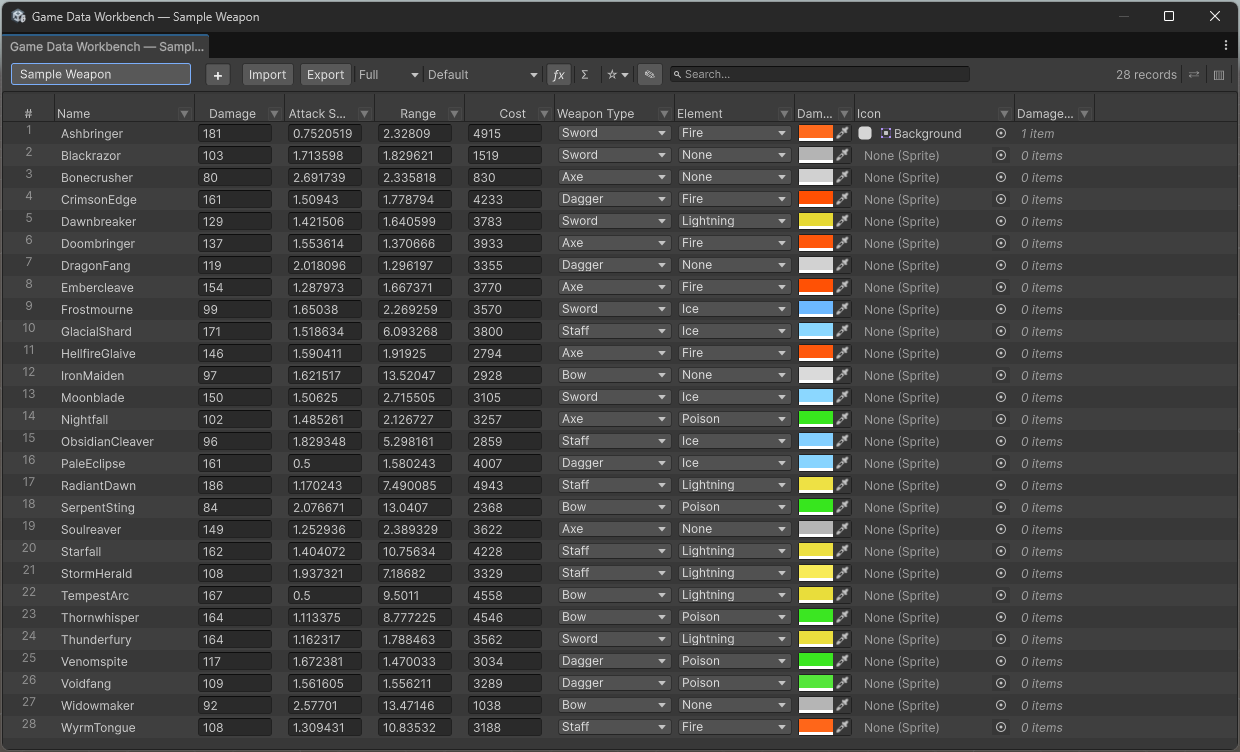
Game Data Workbench is a modular Unity Editor tool for visual game data editing, balancing, and management. It turns your ScriptableObject data into a powerful spreadsheet-style table view with sorting, filtering, bulk editing, computed columns, and much more. Game Data Workbench Core is the foundation — additional modules extend it with charting, team sync, and data validation.
Table View window showing weapon data with multiple columns, filters, and toolbar
### What's Included in Core
Game Data Workbench Core is the base package — everything below is included:
* **Spreadsheet-style table view** — Edit ScriptableObjects in a familiar table layout with inline editing, multi-column sort, and row grouping
* **Powerful search & filtering** — Text search, property-based filters (`damage>50`), type-aware per-column filters, saved searches, and cross-schema search
* **Bulk operations** — Bulk edit, Quick Fill, find & replace, copy/paste with Excel and Google Sheets interop
* **Computed columns** — Add formula-based columns using expressions like `[damage] * [attackSpeed]` with 20+ built-in functions
* **Import & export** — CSV and JSON with column mapping, live preview, and type-safe coercion
* **Schema Creator** — Design new ScriptableObject types visually and generate C# code
* **List editor** — Edit collections and nested data structures in a dedicated side panel
* **Extensible** — Custom cell drawers, search parsers, and data source adapters
### Additional Modules
The following modules are available as separate packages to extend Core:
* **Balance** — Visual data analysis with line, histogram, scatter, and radar charts, drag editing, snapshots, and expression engine
* **Sync** — Advanced team data workflows that build on Core's import/export with token-level diff, change review with field-level accept/reject, and reusable import profiles
* **Validation** — Rule-based data validation with visual overlay, 8 built-in rule types, and custom extensibility
Each module installs as its own package and integrates directly into the Table View interface.
### Get Started
New to Game Data Workbench? Start here:
1. [Installation](/gdw/getting-started/installation.md) — Set up the package in your project
2. [Quick Start](/gdw/getting-started/quick-start.md) — Get productive in 5 minutes
3. [Core Concepts](/gdw/getting-started/core-concepts.md) — Understand schemas, records, and fields
---
# Agent Instructions
This documentation is published with GitBook. GitBook is the documentation platform designed so that both humans and AI agents can read, navigate, and reason over technical content effectively. Learn more at gitbook.com.
## Querying This Documentation
If you need additional information that is not directly available in this page, you can query the documentation dynamically by asking a question.
Perform an HTTP GET request on the following URL with the `ask` and `goal` query parameters:
```
GET https://nenoso.gitbook.io/gdw/readme.md?ask=&goal=
```
`ask` is the immediate question: it should be specific, self-contained, and written in natural language.
`goal` is what the user is ultimately trying to achieve, the reason they need the answer. Sharing it helps GitBook give you a better, more relevant answer. A goal is most helpful when it describes the outcome the user wants rather than restating the question. For example, with `ask=how do I create an API token`, a goal like `build a script that syncs our docs to a CMS` lets GitBook tailor the answer to that use case.
The response will contain a direct answer to the question and relevant excerpts and sources from the documentation.
Use this mechanism when the answer is not explicitly present in the current page, you need clarification or additional context, or you want to retrieve related documentation sections.